
How to Set Up NuVotifier for Minecraft Vote Rewards (2026 Guide)
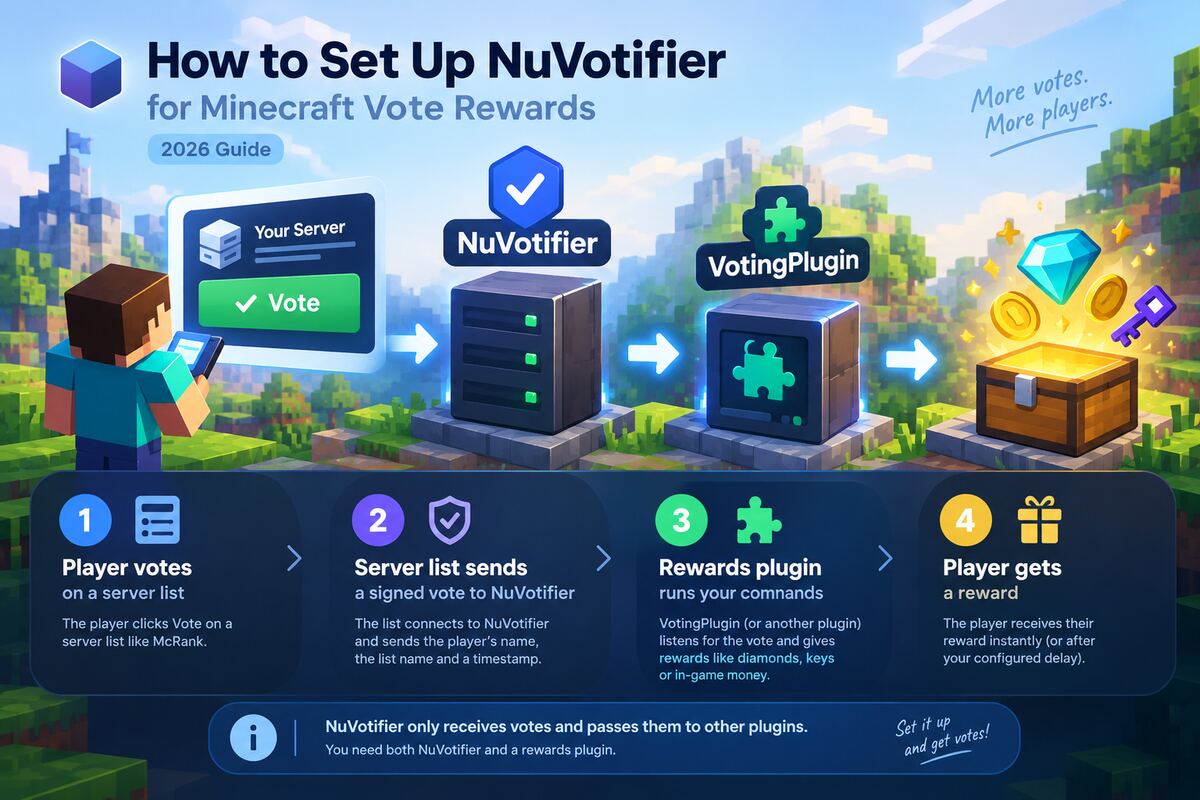
Votes on server lists push your server up the rankings — but players only keep voting if they get something for it. Votifier is the piece that makes that work: when someone votes for your server on a list, the list sends your server a message, and a rewards plugin turns that message into diamonds, keys or in-game money.
This guide walks through the whole setup with NuVotifier, the maintained version of Votifier, from installing the plugin to testing the first vote — and how to fix it when the vote never arrives.
How Vote Rewards Work
Three pieces have to talk to each other:
- A player votes for your server on a server list, such as your McRank listing.
- The server list connects to NuVotifier on your server and sends a signed vote: the player’s username, the list’s name and a timestamp.
- A rewards plugin (VotingPlugin, SuperbVote and others) listens for that vote and runs your reward commands.
NuVotifier does not give rewards on its own. It only receives votes and hands them to other plugins. You need both.
Before You Start
- A server running Paper, Spigot or Purpur, or a BungeeCord / Velocity network. NuVotifier also has a Sponge build.
- Access to your server files and console.
- One free TCP port that the internet can reach. NuVotifier uses
8192by default. On a shared host you usually have to request or add an extra port (often called an “allocation”) in the control panel.
Step 1: Install NuVotifier
- Download
nuvotifier.jarfrom the latest NuVotifier release on GitHub. The same jar works on Paper/Spigot, BungeeCord and Velocity. - Put the jar into your
pluginsfolder. - Restart the server (not
/reload).
NuVotifier creates plugins/NuVotifier/config.yml on first start. On Velocity it creates config.toml instead, with the same settings in TOML syntax (port = 8192, a [tokens] section and so on).
Running a network? Install NuVotifier on the proxy and on every backend server where you want rewards. See Step 5 for how they connect.
Step 2: Configure config.yml
A fresh config looks like this:
host: 0.0.0.0
port: 8192
disable-v1-protocol: false
tokens:
  default: 3f9a1c7e2b...
forwarding:
  method: none
What each setting means:
| Setting | What to put there |
|---|---|
host | 0.0.0.0 to listen on all network interfaces. Leave it unless your host tells you otherwise. |
port | The port votes arrive on. Use 8192 or whatever free port your host gave you. It must not be the game port. |
disable-v1-protocol | Leave false unless you only use lists that speak v2 (see v1 vs v2). |
tokens | Secret keys that prove a vote really comes from the server list. Keep them private. |
Tokens
NuVotifier picks the token by the name of the server list that sends the vote (its serviceName). If a list has no token of its own, default is used.
You can simply give McRank the default token. A cleaner option is a separate token per list, so you can change one without breaking the others:
tokens:
  default: 3f9a1c7e2b...
  mcrank: any-long-random-string-you-choose
McRank sends votes with the service name mcrank, so NuVotifier will use the mcrank token for them.
Restart the server after editing the file.
Step 3: Open the Port
The server list has to reach NuVotifier from the internet. If it can’t, the vote is simply lost.
- Hosting panel (Pterodactyl and similar): add a second port allocation, then put that number in
port. - VPS or dedicated server: allow the port in the firewall, for example
sudo ufw allow 8192/tcp. - Home server: forward the port on your router to the machine running Minecraft.
- Cloudflare: if your domain is proxied through Cloudflare (orange cloud), Votifier traffic will not pass through it. Use a DNS-only record (grey cloud) or your server’s IP address as the Votifier host.
Step 4: Connect Your Server on McRank
- Open My servers and choose your server. Not listed yet? Add it first.
- Find the Votifier notifications card.
- Tick Send a Votifier notification on every vote.
- Fill in:
- Votifier host — your server’s public IP or domain (the machine running NuVotifier, not a Cloudflare-proxied name).
- Votifier port — the
portfrom yourconfig.yml. - Token — the
mcranktoken, ordefaultif you didn’t add one.
- Click Save Votifier settings.
Now check it right away: in the Test your setup section under the form, enter your Minecraft username and click Send test vote. McRank sends one real vote to your saved settings and tells you exactly what happened. The test vote doesn’t count in the ranking, and you can send up to 5 tests every 10 minutes.
When it works, your server console shows a line about a vote from your username. If something is wrong, jump to Troubleshooting.
Step 5: BungeeCord and Velocity Networks
On a network, the server list should talk to the proxy — it is the only part with a public address. The proxy then passes each vote on to the backend servers.
NuVotifier supports two ways to do this. For a single proxy, use plugin messaging.
On the proxy (config.yml, or config.toml on Velocity):
port: 8192
tokens:
  default: 3f9a1c7e2b...
forwarding:
  method: pluginMessaging
On every backend server:
port: -1
forwarding:
  method: pluginMessaging
port: -1 turns off the public listener on the backend, so votes arrive only through the proxy.
On McRank, use the proxy’s address, port and token.
The other method, proxy, makes the proxy resend each vote over the network to every backend’s own NuVotifier listener. It is meant for complex networks; see the NuVotifier setup guide if you need it.
Whichever method you use, make sure your backend servers only accept connections from the proxy. Otherwise players can join a backend directly and skip the proxy’s checks.
Step 6: Give Rewards With VotingPlugin
NuVotifier receives the vote; a rewards plugin decides what the player gets. VotingPlugin is the most popular choice. Install it on the server where players should be rewarded (on a network, the backend servers), then add McRank to plugins/VotingPlugin/VoteSites.yml:
VoteSites:
  McRank:
    Enabled: true
    Name: 'McRank'
    ServiceSite: 'mcrank'
    VoteURL: 'https://mcrank.net/your-server-slug'
    VoteDelay: 24h
    Rewards:
      Commands:
        - 'eco give %player% 500'
        - 'crate key give %player% vote 1'
      Messages:
Player: '&aThanks for voting on McRank!'ServiceSitemust be exactlymcrank— that’s the name McRank sends with every vote. If it doesn’t match, VotingPlugin ignores the vote.VoteURLis the page players open to vote. Use your server page on McRank; the address is shown in your browser when you open it.VoteDelay: 24hmatches McRank: each player can vote once every 24 hours.Commandsare any console commands. Replace them with your economy, crates or ranks plugin’s commands.
Run /av reload after editing.
Prefer something simpler? SuperbVote and similar plugins also listen for NuVotifier votes and run commands. Any plugin that supports NuVotifier will work with McRank.
Make voting worth it
Rewards work best when they are useful but not game-breaking: a bit of money, a crate key, a temporary perk. Remind players with a /vote command and an occasional broadcast. More votes move you up the ranking, which brings new players — see how to get more players.
Troubleshooting
Start with Send test vote on McRank — its message tells you which part is broken.
“No Votifier greeting”
McRank couldn’t get a reply from NuVotifier at your host and port.
- Is NuVotifier running? The console should say it’s listening on your port after startup.
- Is the port open on your host and firewall? See Step 3.
- Are you using the Votifier port, not the game port (
25565)? The game port accepts the connection but never answers like Votifier, so the test times out. - Is the host a Cloudflare-proxied domain? Use the IP or a DNS-only record.
“Something answered, but it is not NuVotifier v2”
A program is listening on that port, but it isn’t NuVotifier — or it’s the old classic Votifier, which only speaks protocol v1. McRank needs NuVotifier’s v2 protocol. Replace the old Votifier jar with NuVotifier; your rewards plugin will keep working.
“Votifier rejected the vote”
NuVotifier received the vote but the signature didn’t match. The token on McRank is not the one NuVotifier used:
- Copy the token again from
config.yml— no spaces or quotes. - If you added an
mcranktoken, McRank must use that token, notdefault. - Restart the server after editing
config.yml.
The test vote arrives, but nobody gets a reward
NuVotifier works; the rewards plugin isn’t picking the vote up.
- Check that
ServiceSiteis exactlymcrank. - On a network, make sure the vote reaches the backend:
forwarding.methodmust bepluginMessagingon the proxy and the backend. - Check your reward command in the console by hand, with a real player name instead of
%player%. - Run NuVotifier’s own test in the console to check rewards without a server list:
/testvoteon the server,/ptestvoteon the proxy.
v1 vs v2: Why the Protocol Matters
Votifier has two ways to send a vote:
- v1 is the original protocol, using an RSA key pair (the
public.keyfile). - v2 is the newer NuVotifier protocol: each vote is signed with a shared token and includes a one-time challenge from your server, so a recorded vote can’t be replayed.
McRank sends votes only over v2. NuVotifier understands both, so installing NuVotifier is all you need. Keep disable-v1-protocol: false if other server lists you use still send v1 votes.
FAQ
Do I need to keep NuVotifier’s port open all the time? Yes. Server lists connect at the moment a player votes. If the port is closed then, that vote’s reward is lost.
Can I use the same token for every server list? Yes — that’s what default is for. Separate tokens just make it easier to replace one if it leaks.
Does the test vote affect my ranking? No. It’s not stored, doesn’t count as a vote and doesn’t trigger Discord notifications. It only checks your setup.
Can players vote more than once a day? On McRank, each player can vote for a server once every 24 hours. Set VoteDelay to 24h so /vote shows the right time.
Does it work on Bedrock servers? Yes, as long as the server runs a platform NuVotifier supports — for example a Paper server with Geyser, or a network behind a BungeeCord or Velocity proxy.
Setting up Votifier takes about ten minutes and keeps paying off: every vote brings your server a little higher in the ranking and gives your players a reason to come back tomorrow. If you’re still setting up the server itself, start with how to make a Minecraft server, then list it on McRank.